This is an old revision of the document!

Orage - A calendar application
- Application Windows - Calendar, Event, Appointment Window details
- Preferences – Customizing the settings of Orage.
Orage is a fast and easy to use graphical time-managing application for the Xfce Desktop Environment. It uses portable ical format and includes common calendar features like repeating appointments and multiple alarming possibilities. Orage does not have group calendar features, but can only be used for single user.
| Orage Calendar |
|---|
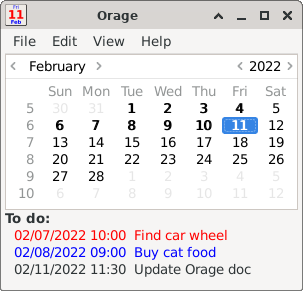
|
Features
- Runs from notification area.
- Import/Export iCal files.
- Alarms.
- View selected date/week.
- Archiving.
- Popup notification for alerts.
- Daily event listing.
Getting started
Orage is started by typing orage on the command line or in the run application window. The command line accepts some options like -v, which tells the version and -h, which shows short usage help. You can also start Orage by clicking on the “Orage Calendar” item in the “Office” submenu from the desktop menu. But usually Orage is started automatically as part of Xfce startup.
The first thing you should do is to adjust your preferences. Before adding any appointments, it is strongly recommended to set your local timezone.
When you run Orage, you will first see the calendar window appearing.
Integration with Xfce panel clock
Orage can be opened by double mouse click to panel clock. Since Xfce 4.18, panel clock properties can be used to enter orage command:
| Calendar Plugin Preferences Window with Orage Command |
|---|

|
Before Xfce 4.18, the following one-liner can be used to create the configuration that calls orage:
COMMAND="orage -t"; xfconf-query -c xfce4-panel -p $(xfconf-query -c xfce4-panel -lv | grep clock | awk '{print $1}')/command -t string -s "$COMMAND" -n
More information about Xfce panel clock hidden settings can be found xfce4-panel - Clock documentation page
Latest Release
- orage 4.20.3 released (2026/03/27 08:21)
- Download current release (older versions of this component are also available here)
Source Code Repository
Reporting Bugs
- Reporting Bugs – List of currently open bugs and instructions on how to submit new bug reports