This is an old revision of the document!
Preferences
Style
| Style Settings |
|---|
|
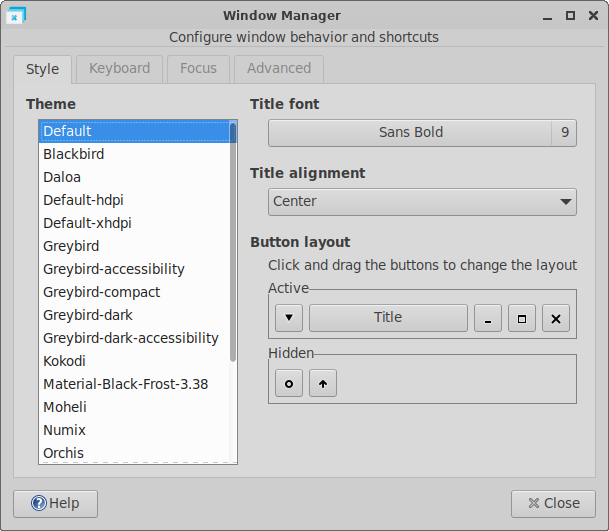
? Theme ! The list on the left side of the dialog shows all avaible window decorations. The xfwm 4 module offers the choice between a small amount of themes, but there are more supplementary themes avaible in xfwm4-themes extra package. ? Title font ! The “Font select” button shows the family font currently in use for the window title appearance. Click this button if you want to change it, and a “Font selection” dialog will appear. It works like the font selection dialog of appearance settings. ? Title alignment ! Whatever the buttons layout is, you can choose the alignment of the title inside the title bar, selecting one of those simple options : align it to the left, center or right. ? Button layout ! The button layout configuration uses an easy drag and drop tool. Click and drag the buttons to change the layout. Drop a button in the “Hidden” area to remove a button from the titlebar. All modifications will have an immediate effect on the title bar buttons position.
Keyboard
| Keyboard Settings |
|---|
|
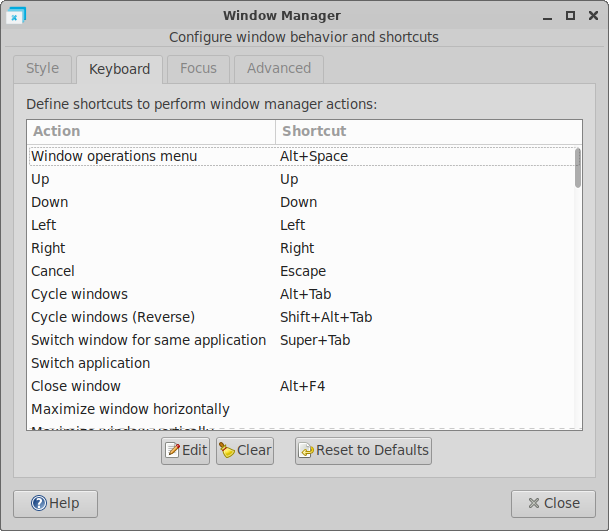
? Window shortcuts ! The actions column shows all the different shortcuts managed by Xfwm4. You can set a new shortcuts by double-clicking the row or press Enter. A dialog will appear to set the new key combination. ? Clear ! Remove the key combination of the selected action. ? Reset to Default ! Reset all shortcuts to their default values.
Focus
| Focus Settings |
|---|
|
Advanced
| Advanced Settings |
|---|
|