This is an old revision of the document!
Clock
The Clock panel plugin displays the current time in a variety of styles and formats.
Properties
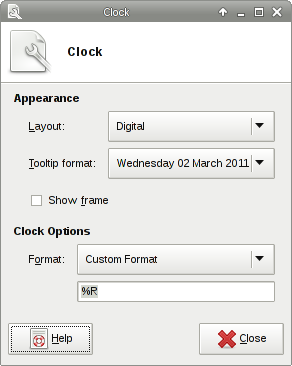
| Clock's properties dialog |
|---|
|
Appearance
? Tooltip Format ! Changes how the time is displayed when hovering over the clock display. ? Show Frame ! Displays a frame around the clock display. ? Layout
? Analog
! Displays time as a clock face with hands representing the current hour, minute, and seconds.
? Binary
! Displays a binary clock.
? Digital
! A simple time display with multiple formats.
? Fuzzy
! Displays an approximation of the current time.
? LCD
! Displays the time in the style of a digital LCD click.
Clock Options
? 24-hour Clock ! Displays time in a 24-hour (military) format. (LCD layout only.) ? Display Seconds ! Displays a seconds indicator in the clock display. (Analog, LCD, and Binary layouts only.) ? Flash Time Seperators ! Flash the seperators between digits. (LCD layout only.) ? Format ! Changes the time format of the clock with predefined or custom layout. (Digital layout only.) ? Fuzziness ! Changes the degree of 'fuzziness' that the clock will display. 0 being the most accurate, 1 being less accurate, and 2 being the least accurate. (Fuzzy layout only.) ? Show AM/PM ! Displays an 'A' or 'P' to indicate the time of day. (LCD layout only.) ? Show Grid ! Adds gridlines to the clock. (Binary layout only.) ? Show Inactive Dots ! All dots that are empty are not shown in the clock display. (Binary layout only.) ? True Binary Clock ! Displays a seconds indicator in the clock display. (Binary layout only.)