This is an old revision of the document!
Clock
The Clock panel plugin displays the current time in a variety of styles and formats.
Properties
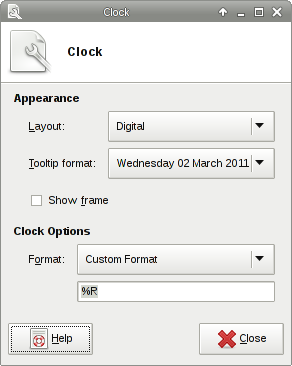
| Clock's properties dialog |
|---|
|
Appearance
? Tooltip Format ! Changes how the time is displayed when hovering over the clock display. ? Show Frame ! Displays a frame around the clock display. ? Layout
? Analog
! Displays time as a clock face with hands representing the current hour, minute, and seconds.
? Binary
! Displays a binary clock.
? Digital
! A simple time display with multiple formats.
? Fuzzy
! Displays an approximation of the current time.
? LCD
! Displays the time in the style of a digital LCD click.
Clock Options
? 24-hour Clock ! Displays time in a 24-hour (military) format. (LCD layout only.) ? Display Seconds ! Displays a seconds indicator in the clock display. (Analog, LCD, and Binary layouts only.) ? Flash Time Seperators ! Flash the seperators between digits. (LCD layout only.) ? Format ! Changes the time format of the clock with predefined or custom layout. (Digital layout only.) ? Fuzziness ! Changes the degree of 'fuzziness' that the clock will display. 0 being the most accurate, 1 being less accurate, and 2 being the least accurate. (Fuzzy layout only.) ? Show AM/PM ! Displays an 'A' or 'P' to indicate the time of day. (LCD layout only.) ? Show Grid ! Adds gridlines to the clock. (Binary layout only.) ? Show Inactive Dots ! All dots that are empty are not shown in the clock display. (Binary layout only.) ? True Binary Clock ! Displays a seconds indicator in the clock display. (Binary layout only.)
Label and Tooltip Markup
The plugin supports markup to change the layout of the tooltip and the label on the panel. Consult the Text Attribute Markup manual of Pango so see what attributes are supported.
Additionally \n for new-lines and \t for tabs are also supported.