This is an old revision of the document!
Window Menu
The Window Menu panel plugin allows you to switch between application windows using a menu.
Properties
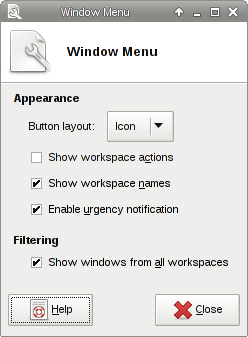
| Window Menu's properties dialog |
|---|
 |
Appearance
? Button Layout ! Changes the appearance of the Window Menu icon in the panel.
? Icon
! Displays the icon of the application window that is currently in focus.
? Arrow
! Displays a dropdown arrow instead of an application icon.
? Show workplace actions ! Enables the ability to add or remove workspaces from within the Window Menu. ? Show workspace names ! Displays the names of available workspaces in the menu. ? Enable emergency notification ! Enables emergency notification for applications which require immediate focus.
Filtering
? Show windows from all workspaces ! When enabled, the Window Menu shows windows from all available workspaces. When disabled, only windows from the current workspace will be shown.